mirror of
https://github.com/garronej/ts-ci.git
synced 2025-11-30 21:43:05 +00:00

156 lines
6.3 KiB
Markdown
156 lines
6.3 KiB
Markdown
<p align="center">
|
||
<img src="https://user-images.githubusercontent.com/6702424/109354825-ab4b8e00-787e-11eb-8336-6009415ecaf6.png">
|
||
</p>
|
||
<p align="center">
|
||
<i> 🚀A starter for any TypeScript project meant to be published on NPM🚀</i>
|
||
<br>
|
||
<br>
|
||
</p>
|
||
|
||
https://user-images.githubusercontent.com/6702424/167035748-4fe28710-ed0f-4feb-a297-bdbdc451c69a.mov
|
||
|
||
`ts-ci` is a project starter like [TSDX](https://github.com/formium/tsdx) or [typescript-starter](https://github.com/bitjson/typescript-starter) but (arguably) better because:
|
||
- It's not a CLI tool, the automation happens with Github Actions.
|
||
Update your `package.json` version number, push. Voila, your new version is published on NPM.
|
||
- It doesn't bundle your library into a single file so users can cherry-pick what they want to import from your lib, your modules will be tree shakable.
|
||
E.g: `import { aSpecificFunction } from "your-module/aSpecificFile"`
|
||
|
||
<p align="center">
|
||
<a href='https://youtu.be/rYaAZg8RYyI'>
|
||
<img src="https://user-images.githubusercontent.com/6702424/127759381-f8bb7efe-231c-4540-84bb-fc17c3d4dc38.gif">
|
||
</a>
|
||
</p>
|
||
|
||
# How to use
|
||
|
||
- Click on 
|
||
- The repo name you will choose will be used as a module name for NPM.
|
||
- Go to the repository ``Settings`` tab, then ``Secrets`` you will need to add a new secret:
|
||
``NPM_TOKEN``, you NPM authorization token.
|
||
- To trigger publishing edit the ``package.json`` ``version`` field ( ``0.0.0``-> ``0.0.1`` for example) then push changes... that's all !
|
||
- Publish pre-release by setting your version number to `X.Y.Z-rc.U` (example: `1.0.0-rc.32`). On NPM the version will be tagged `next`.
|
||
- The CI runs on `main` and on the branches that have a PR open on `main`.
|
||
|
||
# Features
|
||
|
||
This template automates the boring and tedious tasks of:
|
||
- Filling up the ``package.json``
|
||
- Setting up Typescript.
|
||
- Testing on multiple Node version running on Ubuntu and Windows before publishing.
|
||
- Maintaining a CHANGELOG.
|
||
- Publishing on NPM and creating corresponding GitHub releases.
|
||
|
||
Besides, good stuff that comes with using this template:
|
||
- The `dist/` directory is not tracked on the ``main`` branch.
|
||
- Shorter specific file import path.
|
||
``import {...} from "my_module/theFile"`` instead of the usual
|
||
``import {...} from "my_module/dist/theFile"``
|
||
- ESlint and Prettier are automatically run against files staged for commit. (Optional, you can [disable](#disable-linting-and-formatting) this feature)
|
||
|
||
# Examples of project using this template
|
||
|
||
- [keycloakify](https://github.com/garronej/keycloakify)
|
||
- [denoify](https://github.com/garronej/denoify)
|
||
- [tss-react](https://github.com/garronej/tss-react)
|
||
- [EVT](https://github.com/garronej/evt)
|
||
|
||
# FAQ
|
||
|
||
<details>
|
||
<summary>Click to expand</summary>
|
||
|
||
## Can I use `npm` (or something else) instead of `yarn`
|
||
|
||
Yes, just remove the `yarn.lock` file and edit `.github/workflows/ci.yaml`, replace all `yarn ***` by `npm run ****`.
|
||
## What will be included in the npm bundle?
|
||
|
||
All filles listed in [the files property of your package JSON](https://github.com/garronej/ts_ci/blob/974054f2b83f8170317f2b2fa60b5f78e9336c0b/package.json#L35-L41).
|
||
|
||
## How to debug the action
|
||
|
||
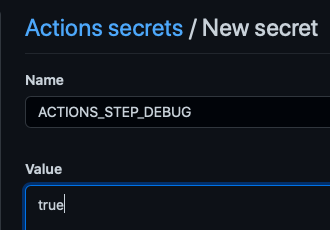
You can increase the verbosity by creating a new secret `ACTIONS_STEP_DEBUG` and setting it to true.
|
||
|
||
|
||
|
||
## Disable linting and formatting
|
||
|
||
Remove [this](https://github.com/garronej/ts_ci/blob/974054f2b83f8170317f2b2fa60b5f78e9336c0b/package.json#L15-L18), [this](https://github.com/garronej/ts_ci/blob/974054f2b83f8170317f2b2fa60b5f78e9336c0b/package.json#L20-L32) and [this](https://github.com/garronej/ts_ci/blob/974054f2b83f8170317f2b2fa60b5f78e9336c0b/package.json#L47-L53) from your `package.json`
|
||
Remove [this](https://github.com/garronej/ts_ci/blob/974054f2b83f8170317f2b2fa60b5f78e9336c0b/.github/workflows/ci.yaml#L12-L26) and [this](https://github.com/garronej/ts_ci/blob/974054f2b83f8170317f2b2fa60b5f78e9336c0b/.github/workflows/ci.yaml#L29) from `github/workflows/ci.yaml`
|
||
Remove `.eslintignore`, `.eslintrc.js`, `.prettierignore` and `.prettierrc.json`.
|
||
|
||
## Accessing files outside the ``dist/`` directory
|
||
|
||
The drawback of having short import path is that the dir structure
|
||
is not exactly the same in production ( in the npm bundle ) and in development.
|
||
|
||
The files and directories in ``dist/`` will be moved to the root of the project.
|
||
|
||
As a result this won't work in production:
|
||
|
||
``src/index.ts``
|
||
```typescript
|
||
import * as fs from "fs";
|
||
import * as path from "path";
|
||
|
||
const str = fs.readFileSync(
|
||
path.join(__dirname,"..", "package.json")
|
||
).toString("utf8");
|
||
```
|
||
|
||
Because ``/dist/index.js`` will be moved to ``/index.js``
|
||
|
||
You'll have to do:
|
||
|
||
``src/index.ts``
|
||
```typescript
|
||
import * as fs from "fs";
|
||
import * as path from "path";
|
||
import { getProjectRoot } from "./tools/getProjectRoot";
|
||
|
||
const str = fs.readFileSync(
|
||
path.join(getProjectRoot(),"package.json")
|
||
).toString("utf8");
|
||
```
|
||
|
||
With `getProjectRoot.ts` being:
|
||
|
||
```typescript
|
||
import * as fs from "fs";
|
||
import * as path from "path";
|
||
|
||
function getProjectRootRec(dirPath: string): string {
|
||
if (fs.existsSync(path.join(dirPath, "package.json"))) {
|
||
return dirPath;
|
||
}
|
||
return getProjectRootRec(path.join(dirPath, ".."));
|
||
}
|
||
|
||
let result: string | undefined = undefined;
|
||
|
||
export function getProjectRoot(): string {
|
||
if (result !== undefined) {
|
||
return result;
|
||
}
|
||
|
||
return (result = getProjectRootRec(__dirname));
|
||
}
|
||
```
|
||
|
||
## How does the automatic ``CHANGELOG.md`` update works?
|
||
|
||
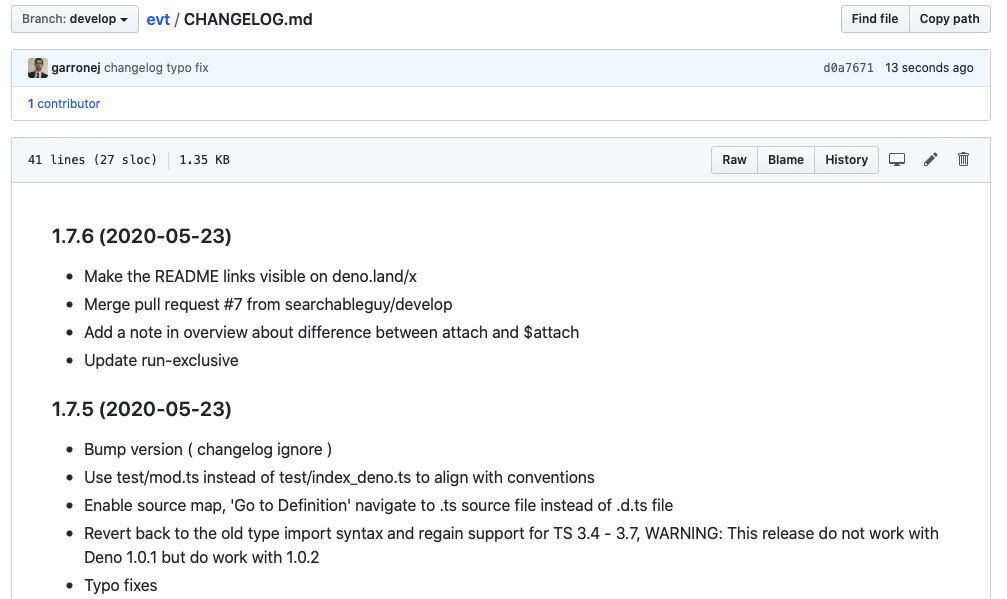
Starting from the second release, a ``CHANGELOG.md`` will be created at the root of the repo.
|
||
|
||
*Example:*
|
||
|
||
|
||
The ``CHANGELOG.md`` is built from the commits messages since last release.
|
||
|
||
Are NOT included in the ``CHANGELOG.md``:
|
||
- The commit messages that includes the word "changelog" ( non-case sensitive ).
|
||
- The commit messages that start with "Merge branch ".
|
||
- The commit messages that with "GitBook: "
|
||
|
||
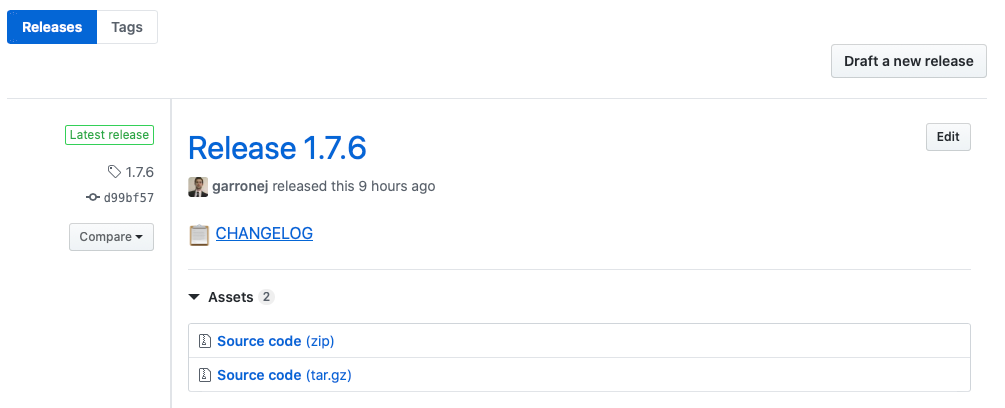
*The GitHub release will point to a freezed version of the ``CHANGELOG.md``*:
|
||
|
||
|
||
</details>
|