mirror of
https://github.com/garronej/ts-ci.git
synced 2025-11-30 21:43:05 +00:00

230 lines
15 KiB
Markdown
230 lines
15 KiB
Markdown
<p align="center">
|
||
<img width="350" src="https://user-images.githubusercontent.com/6702424/109354825-ab4b8e00-787e-11eb-8336-6009415ecaf6.png">
|
||
</p>
|
||
<p align="center">
|
||
<i> 🚀 A project starter for module publisher 🚀</i>
|
||
<br>
|
||
<br>
|
||
</p>
|
||
|
||
Have you written some functions or React component that you're proud of? Do you want to share it as a standalone module on NPM,
|
||
but find yourself unsure about the publishing process or how to manage the lifecycle of an open-source library?
|
||
|
||
Look no further - ts-ci is here to jumpstart your journey towards becoming a proficient NPM module author.
|
||
|
||
Main selling points:
|
||
|
||
- Unlike traditional CLI tools, `ts-ci` utilizes automation within Github Actions. Simply update your `package.json` version number and push. Your new version is automatically published on NPM.
|
||
- It offers the convenience of publishing prereleases. All you need to do is update your package version to a prerelease format like `1.2.3-rc.3`.
|
||
- It fosters enhanced quality control as it runs tests against the submitter's fork whenever a PR is opened.
|
||
- `ts-ci` doesn't bundle your library into a single file. Instead, users can cherry-pick imports from your library, enabling tree shaking. For instance: `import { aSpecificFunction } from "your-module/aSpecificFile"`.
|
||
|
||
|
||
https://user-images.githubusercontent.com/6702424/197344513-065246b9-8823-4894-a9a7-6c539da10655.mp4
|
||
|
||
|
||
# Examples of project using this template
|
||
|
||
- [Keycloakify](https://github.com/garronej/keycloakify)
|
||
- [Denoify](https://github.com/garronej/denoify)
|
||
- [tss-react](https://github.com/garronej/tss-react)
|
||
- [EVT](https://github.com/garronej/evt)
|
||
- [i18nifty](https://github.com/etalab/i18nifty)
|
||
|
||
# How to use
|
||
|
||
> 🗣️ Since a recent GitHub update you need to manually allow GitHub Action to push on your repo.
|
||
> Fo this reason the initial setup will fail.
|
||
> You need to enabled permission and re-run failed job: [see video](https://user-images.githubusercontent.com/6702424/213480604-0aac0ea7-487f-491d-94ae-df245b2c7ee8.mov)
|
||
|
||
- Click on 
|
||
- The repo name you will choose will be used as a module name for NPM.
|
||
- Go to the repository ``Settings`` tab, then ``Secrets`` you will need to add a new secret:
|
||
``NPM_TOKEN``, you NPM authorization token.
|
||
- To trigger publishing edit the ``package.json`` ``version`` field ( ``0.0.0``-> ``0.0.1`` for example) then push changes... that's all !
|
||
- Publish pre-release by setting your version number to `X.Y.Z-rc.U` (example: `1.0.0-rc.32`). On NPM the version will be tagged `next`.
|
||
- The CI runs on `main` and on the branches that have a PR open on `main` (You can publish pre-release from branches this way).
|
||
|
||
# Features
|
||
|
||
- ✍️ Assists in completing the `package.json` details.
|
||
- ✅ Runs your test across various OSes and Node version combinations. [Reference](https://github.com/garronej/ts-ci/blob/4e0b7980315a5156de33c1a4f44907f382bbc862/.github/workflows/ci.yaml#L26-L29). Note: This might be overkill for most use-cases. Feel free to modify the matrix as per your needs.
|
||
- 📦 Supports publishing on NPM along with creating corresponding GitHub releases.
|
||
- 🧪 Enables testing of your local module copy in your application before publishing it on NPM.
|
||
- 🌗 Offers flexibility to use different repository images for dark and light modes. For instance, check out [i18nifty](https://github.com/etalab/i18nifty): [Light](https://user-images.githubusercontent.com/6702424/200299948-94bacf9d-381e-40f8-b9a3-8e726bcd37c5.png) and [Dark](https://user-images.githubusercontent.com/6702424/200299807-42388349-a5ae-44b2-abd1-0aa538b58da2.png). For implementation details, see [here](https://github.com/etalab/i18nifty/blob/f6ad7bb11514224a416158af7af8e4073c7932c1/README.md?plain=1#L1-L11). TS-CI also provides [an additional action](https://github.com/garronej/ts-ci/blob/09916b317c55a04dbf2fc036d7343cd6c6756cc6/.github/workflows/ci.yaml#L105-L107) that removes the dark mode specific image from your README.md before [publishing on NPM](https://www.npmjs.com/package/i18nifty), as NPM does not yet support the `#gh-dark-mode-only` syntax.
|
||
- 🩳 By default, TS-CI incorporates [a step in the workflow](https://github.com/garronej/ts-ci/blob/09916b317c55a04dbf2fc036d7343cd6c6756cc6/.github/workflows/ci.yaml#L102) that relocates your distribution files to the root directory before releasing, allowing your users to import specific files from your module as `import {...} from "my_module/theFile"` rather than "my_module/**dist**/theFile". If you dislike this behavior or if you only have an index.ts file and do not intend for users to selectively import from your module, you may remove [this action](https://github.com/garronej/ts-ci/blob/09916b317c55a04dbf2fc036d7343cd6c6756cc6/.github/workflows/ci.yaml#L102).
|
||
- ⚙️ ESlint and Prettier are automatically triggered against files staged for commit. Despite what [t3dotgg](https://github.com/t3dotgg) says, it's the correct way of doing it,
|
||
that being said, this feature is optional and can be [disabled](https://github.com/garronej/ts-ci/blob/8da207622e51a248542cf013707198cd7cad1d09/README.md?plain=1#L87-L91) if desired.
|
||
|
||
# Release in CJS, ESM or both (but don't bundle!)
|
||
|
||
Contrary to what other guides or project starters may suggest, you don't need to bundle your library (or in other words you don't need to use Vite/Rollup),
|
||
nor do you need to fragment your modules into smaller, independently published units on NPM under the `packages/` directory for your module
|
||
to be tree-shakable (e.g., `@your-module/submodule1`, `@your-module/submodule2`).
|
||
|
||
When you bundle your library, you incorporate __all your dependencies__ into the `.js` code you distribute. This could potentially lead to duplication of dependencies.
|
||
|
||
For instance, if your library depends on the [classnames](https://www.npmjs.com/package/classnames) package, the entirety of `classnames` source code will be included in your bundle. Subsequently, if a user of your library is also directly using `classnames`, there will be two copies of `classnames` in their final application bundle.
|
||
|
||
Another disadvantage of bundling is the lack of selective importing. For example, if a user wishes to import only a specific component or functionality from your module, they would be unable to do so. Instead, they are required to import the entire library.
|
||
|
||
The reality is much simpler. The responsibility of bundling lies with the final application; your role involves merely
|
||
publishing types declaration (`.d.ts`) and the correct flavor of JavaScript files, which are the output of `tsc`.
|
||
|
||
That's all there is to it!
|
||
|
||
## CJS only (default)
|
||
|
||
By default your module release [in CommonJS (CJS)](https://github.com/garronej/ts-ci/blob/8390339b52c98cdbd458d4b945286f999358a1ff/tsconfig.json#L3) with [ESM module interop](https://github.com/garronej/ts-ci/blob/8390339b52c98cdbd458d4b945286f999358a1ff/tsconfig.json#L6).
|
||
|
||
You want to avoid this strategy if:
|
||
- Your module has peer dependencies that provides both an ESM and CJS distribution. (Example `@mui/material`, `@emotion/react`). [This is a problem specific to Vite
|
||
that should be fixed soon](https://github.com/vitejs/vite/pull/13370).
|
||
- You make use of async imports (`import(...).then(...))`).
|
||
- You want your module to be usable in node `type: module` mode *AND* you have some `export default` (if you don't have export default it will work just fine).
|
||
|
||
## ESM only
|
||
|
||
If you want to **only** release as ESM just set `"module": "ES6"` in your `tsconfig.json`.
|
||
You can remove [the listing of your export](https://github.com/garronej/ts-ci/blob/16dbde73a52ea7750a39f0179f121dd8927c1ee5/package.json#L21-L25) in the package.json it's not of any use.
|
||
This option has the advantage, if you are publishing a React library to enable you to import assets file (`.svg`, `.css`) files like for example [here](https://github.com/codegouvfr/react-dsfr/blob/459f2a8f8c4de054217628e281c97520ac9889de/src/AgentConnectButton.tsx#L7-L10) (Don't forget to copy your the assets from your `src/` to your `dist/` though, TypeScript don't do it for you).
|
||
|
||
You want to avoid this strategy if:
|
||
- You want your module to be usable with node. The ESM distribution produced by TypeScript is an ESM distribution
|
||
that node in `type: module` can process (files need to have `.mjs` extension, exports need to be listed).
|
||
As a result your module won't be usable at all on node except through Next.js that will be able to make it work.
|
||
Note that it will work out of the box in Next.js setup using [the AppDir router](https://nextjs.org/docs/app/building-your-application/routing)
|
||
but for project using the legacy [pagesRouter](https://nextjs.org/docs/pages/building-your-application/routing) your user will have to add
|
||
`transpilePackages: ["<your-module>"]` in their `next.config.js` file. [Example](https://github.com/garronej/react-dsfr-next-demo/blob/70ca68eebe326fab73f8cbd41a9f0c0bb2f15e8a/next.config.js#L14).
|
||
This means also that you'd have to tell your users to configure their JEST so that it transpiles your module
|
||
using `"transformIgnorePatterns": [ "node_modules/(?!@codegouvfr/react-dsfr)" ]`.
|
||
If you publish scripts (your `package.json` has a `bin` property) you'll need to [transpile your script separately in CJS](https://github.com/garronej/ts-ci/issues/1#issuecomment-1556046899).
|
||
|
||
## ESM for bundlers (browser) + CJS for node.
|
||
|
||
- Have a `tsconfig.json` that targets CSM (as by default): [example](https://github.com/garronej/tss-react/blob/main/tsconfig.json)
|
||
- Perform two build, one for CJS, one for ESM. [example](https://github.com/garronej/tss-react/blob/3cab4732edaff7ba41e3f01b7524b8db47cf7f25/package.json#L43)
|
||
- Explicitly list your exports in your `package.json`, `"module"` the condition for bundlers
|
||
`"default"` is what will be picked up by node. [example](https://github.com/garronej/tss-react/blob/52ee92df56ef9fc82c0608deb4c35944b82b7b74/package.json#L11-L52).
|
||
|
||
You want to avoid this strategy if:
|
||
- You use `export default` and you want to support node in `type: module` mode.
|
||
- You have lazy import (`import(...).then(...)`) and you want them to be lazy not only on the browser but on node too.
|
||
|
||
## Deno
|
||
|
||
Regardless of the scenario you opt for you can always release for Deno using [Denoify](https://denoify.dev).
|
||
|
||
## CJS + A real ESM distribution, fully compliant with the standard
|
||
|
||
Pursuing a fully compliant CJS + ESM distribution comes with caveats. It only works well if all your dependencies are adherent to the standard, a condition that [most modules fail to meet](https://github.com/mui/material-ui/issues/37335).
|
||
|
||
This method introduces the risk of your package being simultaneously loaded in both CJS and ESM in a single application. It also poses a similar risk to your dependencies.
|
||
|
||
Thus, proceed with this option only if it's necessary for your lazy imports to actually be lazy when your code runs on Node.js.
|
||
|
||
- To transpile in ESM, use [`js2mjs`](https://github.com/garronej/js2mjs) to ensure your ESM distribution generated by TypeScript is fully compliant with the standard ([An external script should not be required for this!](https://github.com/microsoft/TypeScript/issues/18442)). [See Example](https://github.com/garronej/tsafe/blob/6d08839c3b0695edbc3443d21b256043cd98787b/package.json#L10-L12)
|
||
- Declare your exports using both `require` and `import`. [See Example](https://github.com/garronej/tsafe/blob/6d08839c3b0695edbc3443d21b256043cd98787b/package.json#L64-L78).
|
||
|
||
Checkout the full example with [tsafe](https://github.com/garronej/tsafe/tree/6d08839c3b0695edbc3443d21b256043cd98787b) (use the specifically this link, the current version doesn't release an
|
||
ESM distribution anymore, it doesn't need to).
|
||
|
||
## I have questions
|
||
|
||
If you find your self thinking:
|
||
|
||
"I don't know man, ESM, CJS, I have no idea, I just want my stuff to work!"
|
||
"None of the option above covers all my requirement?"
|
||
"Why can't I have a solution that work in every case?"
|
||
"Why can't I publish an actual standard compliant ESM distribution?"
|
||
|
||
Just [start a discussion](https://github.com/garronej/ts-ci/discussions) or hit [my Twitter DM](https://twitter.com/GarroneJoseph) I'll be happy to provide further guidance.
|
||
|
||
|
||
|
||
# FAQ
|
||
|
||
<details>
|
||
<summary>Click to expand</summary>
|
||
|
||
## Can I use `npm` (or something else) instead of `yarn`
|
||
|
||
Yes, just remove the `yarn.lock` file and edit `.github/workflows/ci.yaml`, replace all `yarn ***` by `npm run ****`.
|
||
Note however that the the script (`scripts/link-in-app.ts`) that enable you to test in an external app will no longer work.
|
||
|
||
## What will be included in the npm bundle?
|
||
|
||
All filles listed in [the files property of your package JSON](https://github.com/garronej/ts_ci/blob/974054f2b83f8170317f2b2fa60b5f78e9336c0b/package.json#L35-L41).
|
||
|
||
|
||
## How to debug the action
|
||
|
||
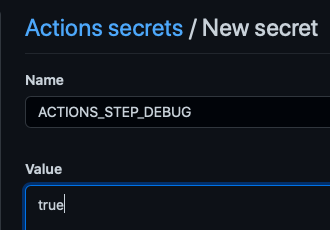
You can increase the verbosity by creating a new secret `ACTIONS_STEP_DEBUG` and setting it to true.
|
||
|
||
|
||
|
||
## Disable linting and formatting
|
||
|
||
Remove [this](https://github.com/garronej/ts_ci/blob/974054f2b83f8170317f2b2fa60b5f78e9336c0b/package.json#L15-L18), [this](https://github.com/garronej/ts_ci/blob/974054f2b83f8170317f2b2fa60b5f78e9336c0b/package.json#L20-L32) and [this](https://github.com/garronej/ts_ci/blob/974054f2b83f8170317f2b2fa60b5f78e9336c0b/package.json#L47-L53) from your `package.json`
|
||
Remove [this](https://github.com/garronej/ts_ci/blob/974054f2b83f8170317f2b2fa60b5f78e9336c0b/.github/workflows/ci.yaml#L12-L26) and [this](https://github.com/garronej/ts_ci/blob/974054f2b83f8170317f2b2fa60b5f78e9336c0b/.github/workflows/ci.yaml#L29) from `github/workflows/ci.yaml`
|
||
Remove `.eslintignore`, `.eslintrc.js`, `.prettierignore` and `.prettierrc.json`.
|
||
|
||
## Accessing files outside the ``dist/`` directory (when [this line is present in your repo](https://github.com/garronej/ts-ci/blob/eabbcfa5b22777c6b051206d8f4e2c8a8624c853/.github/workflows/ci.yaml#L100))
|
||
|
||
The drawback of having short import path is that the dir structure
|
||
is not exactly the same in production ( in the npm bundle ) and in development.
|
||
|
||
The files and directories in ``dist/`` will be moved to the root of the project.
|
||
|
||
As a result this won't work in production:
|
||
|
||
``src/index.ts``
|
||
```typescript
|
||
import * as fs from "fs";
|
||
import * as path from "path";
|
||
|
||
const str = fs.readFileSync(
|
||
path.join(__dirname,"..", "package.json")
|
||
).toString("utf8");
|
||
```
|
||
|
||
Because ``/dist/index.js`` will be moved to ``/index.js``
|
||
|
||
You'll have to do:
|
||
|
||
``src/index.ts``
|
||
```typescript
|
||
import * as fs from "fs";
|
||
import * as path from "path";
|
||
import { getProjectRoot } from "./tools/getProjectRoot";
|
||
|
||
const str = fs.readFileSync(
|
||
path.join(getProjectRoot(),"package.json")
|
||
).toString("utf8");
|
||
```
|
||
|
||
With `getProjectRoot.ts` being:
|
||
|
||
```typescript
|
||
import * as fs from "fs";
|
||
import * as path from "path";
|
||
|
||
function getProjectRootRec(dirPath: string): string {
|
||
if (fs.existsSync(path.join(dirPath, "package.json"))) {
|
||
return dirPath;
|
||
}
|
||
return getProjectRootRec(path.join(dirPath, ".."));
|
||
}
|
||
|
||
let result: string | undefined = undefined;
|
||
|
||
export function getProjectRoot(): string {
|
||
if (result !== undefined) {
|
||
return result;
|
||
}
|
||
|
||
return (result = getProjectRootRec(__dirname));
|
||
}
|
||
```
|
||
|
||
</details>
|